Walmart Receipt Lookup Tool: Find Lost Receipts in 5 Ways
This has happened to me quite often; I am holding a faded receipt or have lost it altogether. I remember buying something at Walmart but have no proof of purchase. The good news is that Walmart stores your digital receipt history, and retrieving it is faster than you’d think in 2026.
Walmart’s Receipt Lookup tool and mobile app make recovery straightforward, though the method that works best depends on how you paid and which device you use.
Key Takeaways
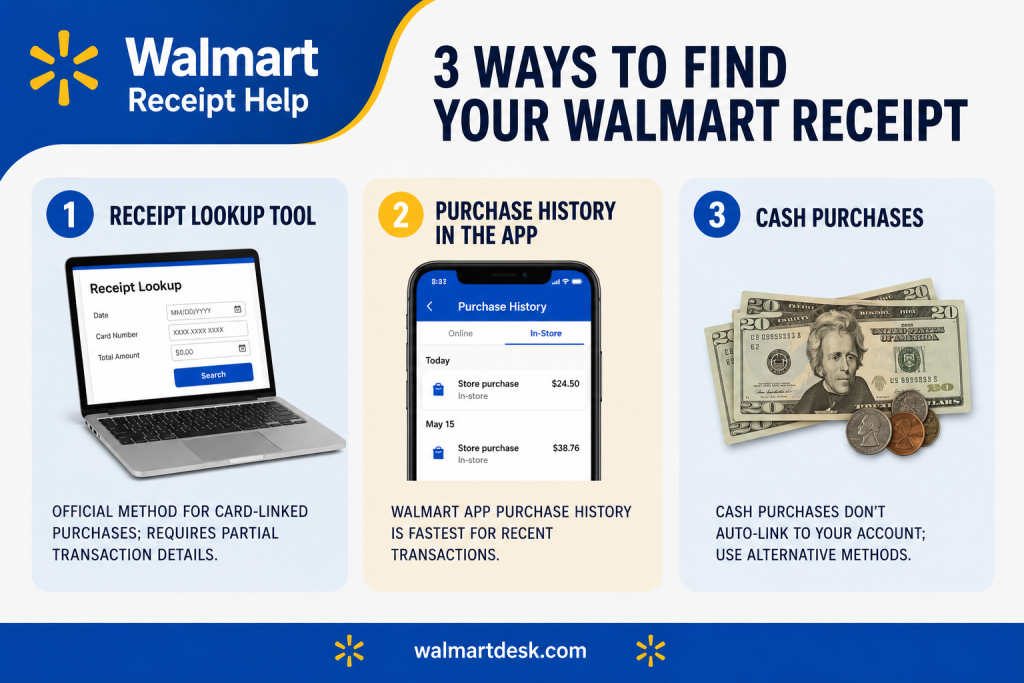
- Receipt Lookup tool is the official method for card-linked purchases; requires partial transaction details
- Walmart app’s Purchase History is fastest for recent transactions; no manual entry needed
- Cash purchases require alternative methods since they don’t auto-link to your account
The Official Receipt Lookup Tool
Walmart’s Receipt Lookup tool is the main system for retrieving card-linked purchases. It’s different from your Purchase History page, this tool actively searches Walmart’s transaction database using the details you provide.
The process takes four steps:
✦ Enter store location by ZIP code or city-state
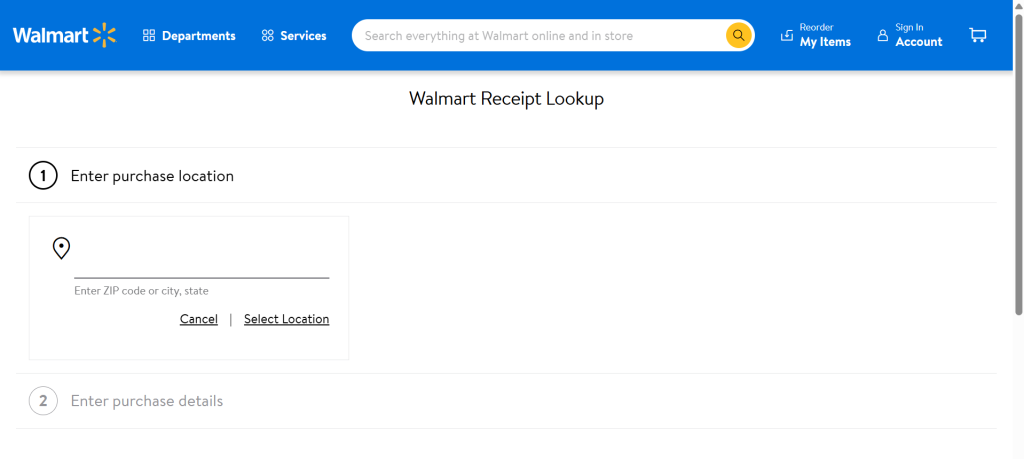
✦ Select purchase date or date range
✦ Provide payment method and last 4 digits of the card used
✦ Enter receipt total and complete CAPTCHA verification
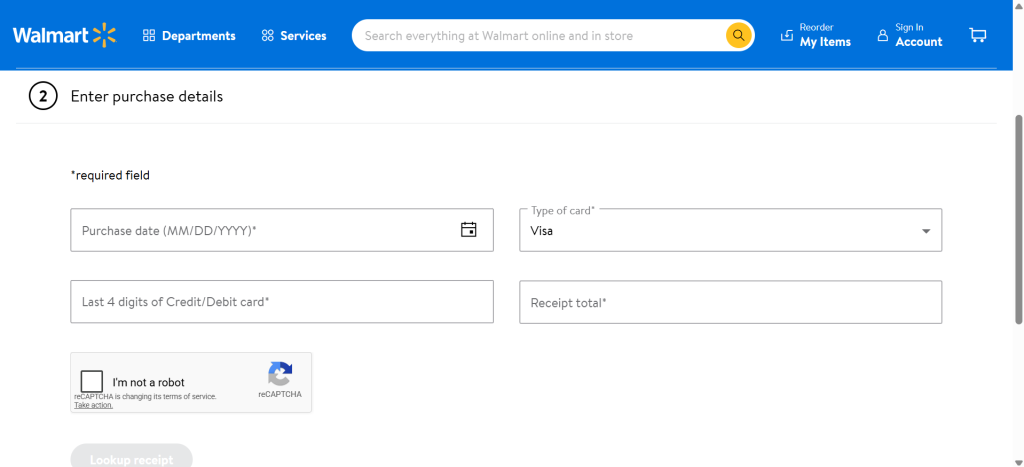
Store location and purchase date are mandatory. Card details and receipt total improve your odds of a match, but the system sometimes finds it with just the store and date if you’re willing to try the CAPTCHA a few times.
Note
The tool works best for purchases within the past 12-24 months. For anything older, contact Walmart Customer Service.
Lookup Tool Returns No Results
There can be multiple reasons that Walmart lookup tool returns no results.
Wrong store location
The tool searches only the store where you made the purchase. If you entered your current ZIP code instead of the store’s location, you’ll get no results.
★ Double-check the store address on any old receipt or call the store directly to confirm its ZIP code.
Date outside retention window
Walmart retains digital receipts for approximately 24 months. If your purchase is older, the Receipt Lookup tool won’t find it.
Try contacting Walmart Customer Service with your card details, they may access store records manually for older transactions.
Unlinked payment method
If you paid with a card that wasn’t linked to your Walmart account at the time of purchase, Receipt Lookup can’t find it.
Try the Purchase History section in the Walmart app first, or contact support to manually search store records.
Cash transaction
The Receipt Lookup tool only works for card payments. Cash purchases don’t auto-populate in the system unless you provided an email or phone number at checkout.
CAPTCHA or timeout errors
Clear your browser cache, try a different browser, or wait 15 minutes before retrying.
If the issue persists, call Walmart support, they can retrieve your receipt manually using your card number, store location, and approximate purchase date.
Walmart App Purchase History
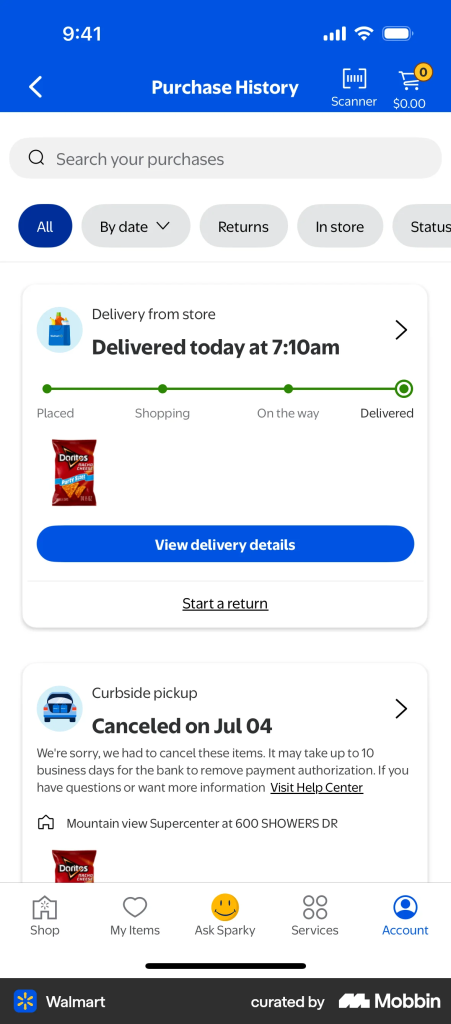
The Walmart app’s Purchase History feature is the fastest way to find recent receipts. No manual entry or CAPTCHA, just tap and view.
✦ Open Walmart app
✦ Tap Account icon (bottom right)
✦ Tap Purchase History
✦ Scroll to find the transaction
✦ Tap to view full receipt.
Purchase History shows all linked card transactions automatically and displays receipts for the past 2+ years.
Unlike the Receipt Lookup tool, there’s no searching required, your entire transaction history loads at once, sorted by date.
The app’s barcode scanner is a shortcut many users miss. If you have a paper receipt in hand, tap the search icon, then the barcode icon, and scan the receipt barcode. The app instantly retrieves the full digital receipt, faster than typing transaction details into Receipt Lookup.
Both Walmart+ members and non-members have equal access to Purchase History. Membership doesn’t provide enhanced receipt tracking.
Filter Receipts by Date or Item Name
The app’s Purchase History allows filtering by date range. If you remember roughly when you shopped, you can narrow results by month or year instead of scrolling through two years of transactions.
If you have multiple cards linked to your account, you can filter by payment method to view receipts from a specific card.
Cash Purchases
This is where Walmart’s digital receipt system breaks down.
Cash transactions don’t auto-link to Walmart accounts, so they won’t appear in Receipt Lookup or Purchase History unless you provided an email or phone number at checkout.
If you paid cash but didn’t opt into digital receipt delivery, let me tell you four concrete workarounds:
- Request digital receipt at checkout next time. Provide your email or phone number to the cashier. Receipt will be emailed or texted immediately, creating a permanent digital backup.
- Ask a store associate for manual lookup. Visit the store where you made the purchase. Provide the location, approximate date, and receipt total. The associate can search store records and reprint a receipt.
- Use bank statement as proof of purchase. If you withdrew cash and can document the ATM transaction date and location, your bank statement serves as proof for returns or warranty claims. Most retailers accept bank statements as proof of funds transfer.
- Call 1-800-WALMART with your store location, approximate purchase date, and receipt total. Support may retrieve the transaction from the store’s system manually.
Cash receipts are retained in-store for 30-90 days. After that window, manual retrieval becomes impossible without account linkage.
Email Confirmations
Walmart auto-sends digital receipts to linked email addresses for all transactions, provided you gave your email at checkout. These emails are permanent, they’re not subject to Walmart’s digital retention window.
To find them, search your email inbox for “receipt” or “Walmart order confirmation.” Filter by sender to isolate receipts from Walmart.com email address. Email receipts serve as a backup if the app or Receipt Lookup tool fails.
- For online orders, confirmation emails are automatic.
- For in-store purchases, emails are sent only if you provided your email address at the register.
Note
If you didn’t provide an email at checkout, no receipt email will exist, so always share your email or phone number with the cashier to ensure digital backup.
Receipts for Returns, Gifts, and Marketplace Orders
Not every receipt shows up the same way, returns, gifts, and third-party orders each work a bit differently.
Returned or refunded items
These still appear in Purchase History, but the receipt may be marked “returned” or “refunded.” For proof of return, request a separate receipt from the cashier at the time of return, or check Order Details in the app for the refund confirmation.
Gifts purchased on your account
If someone else bought a gift using your account, the receipt shows up in your Purchase History under their name or as a “gift order.”
If they used their own account, you can’t access their receipt directly, they’ll need to share it with you.
Shared household accounts
Secondary account holders may have limited visibility into all household receipts, depending on account setup. Contact Walmart support to check permission settings if you can’t see all family purchases.
Walmart Marketplace third-party receipts
Purchases from third-party sellers on Walmart.com don’t appear in the standard Receipt Lookup tool.
★ Go to your Walmart.com account → Orders → find the item → click “View Invoice,” or contact the seller directly.
Walmart+ subscription items
Recurring and subscription purchases appear in Purchase History like regular transactions. There’s no separate subscription receipt tracking.
Managing Receipts Across Multiple Cards
If you have multiple payment methods linked to your account, all receipts appear together in Purchase History on both the app and website.
The Receipt Lookup tool lets you filter by card (last 4 digits), so if your first search fails, try a different linked card.
Make sure all your payment methods are linked to your Walmart account. Unlinked cards won’t show up in Purchase History or Receipt Lookup.
Exporting Receipts for Taxes and Business Expenses
As of 2026, Walmart doesn’t offer native CSV export or bulk download of receipt history. Here are some workarounds:
- Screenshot individual receipts from Purchase History and save to a folder
- Forward email receipts to a dedicated accounting email address
- Reconcile Walmart transactions against your bank or credit card statement, the most reliable method for tax purposes
- Contact Walmart Business Customer Service if you have a business account, enterprise-level options may exist
Bank statements showing Walmart transactions are legally acceptable proof of purchase for tax deductions and warranty claims. Digital receipts aren’t required if you can document the transaction date and amount through your bank records.
My Suggestions
I would suggest linking all your payment methods to your Walmart account and enable email receipt notifications in account settings. This ensures automatic digital receipt backup for every purchase, either you pay with card or cash.
For items requiring returns within 30 days or items with warranties, save important receipts to a dedicated email folder immediately after purchase.
Take a photo of paper receipts as a secondary backup, photo plus email confirmation gives you redundant proof.